
Disclosure: This post contains affiliate links. If you purchase through a link on this page, we may earn a small commission at no extra cost to you. We only recommend products we’d use in our own tanks.
Most fishkeepers think temperature is the biggest threat during a power outage. It’s not. Oxygen is. Without circulation from your filter, powerhead, or return pump, dissolved oxygen in a stocked aquarium can drop to dangerous levels in as little as two to four hours. Your fish suffocate before the water even has time to cool down.
Temperature matters too, especially in reef tanks and heated tropical setups where the room temperature sits well below the water temperature. But the immediate killer in a power outage is the loss of water movement. No flow means no gas exchange at the surface, no oxygenated water reaching your fish, and beneficial bacteria in your filter media beginning to die off from lack of oxygen themselves – setting the stage for an ammonia spike even after power returns.
The good news is that a battery backup doesn’t have to be expensive or complicated. A $35 rechargeable air pump can keep a tank alive for 20+ hours. A $150 UPS can run your return pump and heater for a few critical hours while you figure out your next move. And for reef keepers running EcoTech pumps, a dedicated battery backup can maintain flow for over 30 hours. The key is knowing what to protect first and sizing your backup accordingly.
Quick Comparison
| Product | Type | Runtime | Price Range | Best For |
|---|---|---|---|---|
| CyberPower CP1500PFCLCD | Sine Wave UPS | 45-90 min | ~$220-260 | Full tank backup (pumps, heater, filter) |
| APC BE850M2 | Simulated Sine Wave UPS | 20-45 min | ~$100-155 | Budget UPS for short outages |
| EcoTech VorTech Battery Backup | DC Pump Battery | 30-72 hrs | ~$200-250 | Reef tanks with EcoTech pumps |
| Hygger Battery Backup Air Pump | Rechargeable Air Pump | 20-79 hrs | ~$30-40 | Emergency aeration on a budget |
What to Back Up First (Priority Order)
You can’t run everything on battery power forever, so you need to prioritize. Here’s the order that matters most, based on how quickly each system failure will kill livestock:
1. Water Flow (Critical – Hours to Failure)
This is the single most important thing to keep running. A return pump, powerhead, or even just an air pump driving a sponge filter keeps oxygen levels up and prevents dead spots in the water column. In a reef tank, flow also keeps coral tissue from accumulating waste and suffocating. Without any water movement, a heavily stocked tank can see oxygen crash within two to four hours. Even a simple battery-powered air pump providing surface agitation can buy you 24+ hours.
2. Temperature Control (Important – Hours to Days)
How fast temperature becomes a problem depends entirely on the gap between your tank temperature and room temperature. If your house sits at 72°F and your tank runs at 78°F, you have many hours before the water drops enough to stress tropical fish. If your house is 55°F in winter or 95°F in summer, temperature becomes urgent much faster. Heaters draw significant wattage (100-300W for most tanks), which drains a UPS battery quickly. For short outages under a few hours, insulating the tank with blankets or towels is more practical than trying to run a heater on battery power.
3. Filtration (Less Urgent – Days to Failure)
Your biological filter bacteria will survive without flow for roughly 4-8 hours before they start dying off in significant numbers. The filter itself doesn’t need to be running at full capacity during an outage – it just needs enough oxygen to keep bacteria alive. If you’re running a sponge filter on an air pump with battery backup, you’re covering both flow and filtration with one device. For canister filter users, the bacteria inside the sealed canister will die faster than those in a HOB or sump because of the lack of airflow. Don’t restart a canister that’s been off for more than 6-8 hours without rinsing the media first – the die-off can release a slug of ammonia directly into your tank.
4. Lighting (Not Urgent)
Your fish and coral can handle a day or two without lights. Don’t waste battery capacity running LEDs during an outage. Even in a reef tank, corals can tolerate darkness for 48+ hours without significant damage. Save every watt of battery power for flow and heat.
Sine Wave vs. Simulated Sine Wave UPS: Why It Matters for Aquariums
If you’re shopping for a UPS (Uninterruptible Power Supply), you’ll see two types: pure sine wave and simulated (or stepped) sine wave. The difference matters for aquarium equipment more than it does for computers.
A pure sine wave UPS produces smooth, clean AC power identical to what comes from your wall outlet. Aquarium equipment with AC motors – particularly older-style powerheads, return pumps, and wavemakers – runs best on pure sine wave power. A simulated sine wave UPS produces a choppier approximation that can cause AC motors to buzz, run hot, or stall entirely. Modern DC pumps with their own power adapters are generally fine on either type since the adapter converts AC to DC regardless.
The practical advice: if you’re running any AC-powered pump or powerhead directly into a UPS, get a pure sine wave model. If everything in your tank runs on DC power adapters (wall warts), a simulated sine wave UPS will work fine and costs less. When in doubt, go sine wave – it’s compatible with everything and costs roughly $50-80 more for the peace of mind.
Best Aquarium Battery Backups
Best Overall UPS: CyberPower CP1500PFCLCD Pure Sine Wave
Best For: Running your full essential equipment (return pump, heater, powerhead) through short to medium outages.

The CyberPower CP1500PFCLCD is the UPS most serious fishkeepers end up with, and it’s the one I’d recommend for any tank where the equipment investment justifies the protection. At 1500VA/1000W with pure sine wave output, it cleanly powers any aquarium equipment you connect to it – AC motors, DC adapters, heaters, the works. No buzzing, no stalling, no compatibility worries.
Runtime depends entirely on what you plug in. With just a return pump and a small powerhead drawing 50-80W total, expect 45-90 minutes of battery time. Add a heater and that drops to 20-30 minutes because heaters are power-hungry. The built-in LCD screen shows real-time load, estimated runtime, and battery health, so you always know where you stand. The AVR (Automatic Voltage Regulation) feature also stabilizes incoming power during brownouts and sags, which protects your equipment even when the power is technically “on” but unstable – common during storms.
It has 12 outlets total (6 with battery backup + surge protection, 6 surge-only) plus 2 USB ports. The batteries are user-replaceable, which means you don’t need to buy a new unit when they wear out after 3-5 years – just swap in fresh battery packs. CyberPower also offers free monitoring software and a smart app for tracking power events remotely.
The honest caveat: at ~$220-260, it’s a real investment. The outlets are tightly spaced, making it hard to fit multiple wall-wart style adapters side by side (use short extension cords to solve this). And like all UPS systems, it’s designed for bridging short outages – not powering a tank for a full day. For extended outages beyond a couple of hours, you’ll need a generator or a different strategy.
Pros
- Pure sine wave – safe for all aquarium equipment including AC motors
- 1500VA/1000W handles everything you’d need to back up
- LCD shows real-time load, runtime estimate, and battery health
- AVR protects equipment during brownouts and voltage sags
- Batteries are user-replaceable for long-term value
Cons
- ~$220-260 is a significant investment
- Tightly spaced outlets don’t accommodate large plug heads well
- 45-90 minutes runtime with typical aquarium load – not designed for extended outages
Best Budget UPS: APC BE850M2
Best For: Fishkeepers who want basic outage protection without spending $200+ on a UPS.
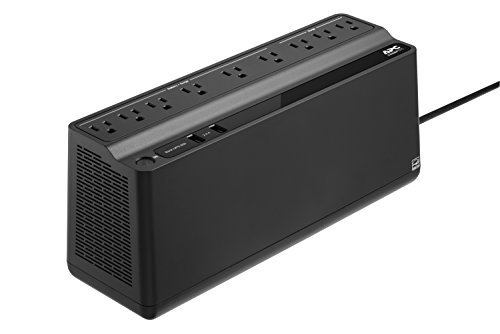
The APC BE850M2 is a solid entry point for tank protection at roughly half the price of the CyberPower. APC is one of the most trusted names in UPS systems, and the 850VA model gives you enough capacity to keep a return pump or powerhead running for 20-45 minutes during a short outage. Available in multiple sizes (425VA through 850VA), the 850VA is the minimum I’d recommend for most aquarium setups.
It has 9 outlets (6 battery-backed with surge protection, 3 surge-only) plus 2 USB charging ports. An audible alarm alerts you the moment it switches to battery power, which is genuinely useful if the power goes out while you’re in another room or sleeping – you’ll know immediately and can start making decisions about what to keep running and what to unplug.
The honest caveat: this is a simulated sine wave UPS, not a pure sine wave. If you’re running AC-powered pumps (older Maxi-Jets, certain HOB filters, some return pumps), they may buzz or run inefficiently on battery power. Modern DC pumps with their own power adapters will be fine. The battery is technically user-replaceable but harder to access than the CyberPower’s, often requiring you to partially disassemble the unit. Runtime is also shorter – around 20-30 minutes with a typical aquarium load, which is enough to bridge a brief outage but not much more.
Pros
- Trusted brand at a reasonable price (~$100-155)
- Audible alarm when switching to battery power
- 9 outlets with clear labeling for battery vs. surge-only
- Replaceable batteries for long-term use
Cons
- Simulated sine wave – may cause issues with AC-powered pumps
- Shorter runtime than the CyberPower (20-30 min typical)
- Battery replacement requires partial disassembly
- Outlets are tightly spaced
Best DC Pump Backup: EcoTech VorTech Battery Backup
Best For: Reef keepers running EcoTech VorTech or Vectra pumps who want multi-day flow protection.
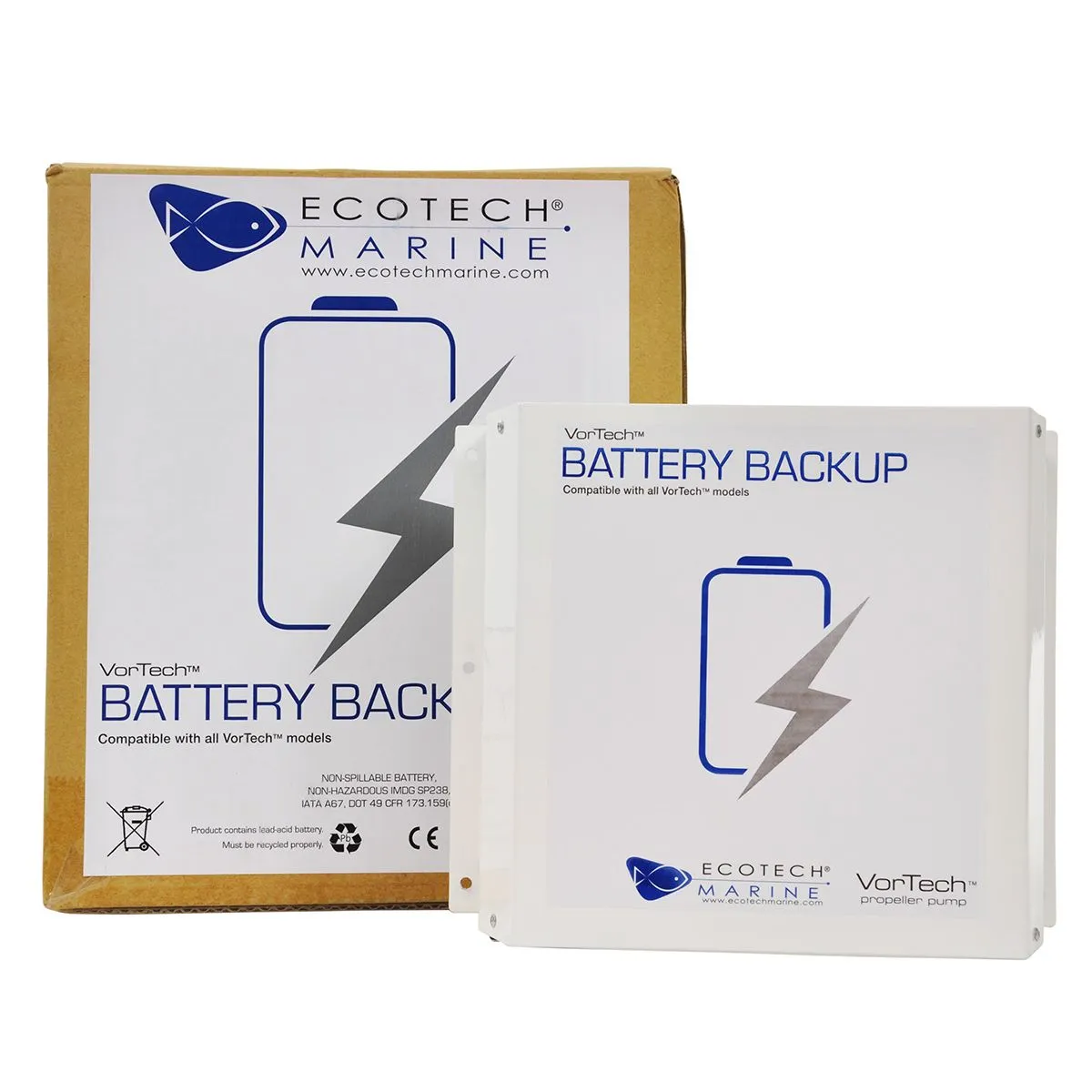
If you run EcoTech VorTech or Vectra pumps on your reef tank, this is the battery backup to get. Unlike a UPS that converts AC to battery and back to AC (losing efficiency at every step), the EcoTech Battery Backup powers your DC pumps directly from a sealed 12V battery – no conversion losses, no wasted energy. The result is dramatically longer runtime: up to 36 hours on a single MP40, up to 72 hours on an MP10 or MP20, and 30+ hours running two VorTech pumps simultaneously.
The setup is simple. Connect the battery between the wall outlet and your pump driver. While power is on, the trickle charger keeps the battery topped up. When power cuts, the battery seamlessly takes over. Your pump automatically drops to about 30% intensity to conserve energy, which provides enough flow to keep coral alive and oxygen levels stable without draining the battery in a few hours. You can daisy-chain two battery units together to double runtime for truly extended outages.
The honest caveat: this only works with EcoTech Marine products. If you run Jebao, Maxspect, AI, or any other brand of pump, this battery won’t help you. It also doesn’t power heaters, lights, or any other equipment – it’s purely for maintaining flow through your EcoTech pumps. At ~$200-250, it’s not cheap, but for a reef tank with thousands of dollars in coral, it’s one of the best insurance policies you can buy. The internal batteries can be DIY-replaced for about $35-40 when they wear out after 3-5 years, which hobbyists on Reef2Reef have documented extensively.
Pros
- 30-72 hours of runtime – nothing else comes close
- Direct DC power means no conversion losses
- Automatic failover – no manual intervention needed
- Can daisy-chain for double runtime
- DIY battery replacement keeps long-term costs low
Cons
- Only compatible with EcoTech VorTech and Vectra pumps
- ~$200-250 for flow backup only – doesn’t power heaters or other equipment
- Vectra return pumps require an additional booster cable (sold separately)
Best Emergency Air Pump: Hygger Battery Backup Air Pump
Best For: Every fishkeeper who needs affordable emergency aeration they can set up and forget.

If you don’t have any battery backup at all, this is where to start. The Hygger Battery Backup Air Pump plugs into a wall outlet and runs like a normal air pump day-to-day. The moment the power goes out, it automatically switches to its built-in 10,000mAh rechargeable lithium battery and keeps pumping air into your tank without you lifting a finger. That automatic switchover is the key feature – if the power goes out at 3 AM while you’re sleeping, this pump doesn’t wait for you to wake up and do something about it.
Runtime is impressive for the price: up to 20 hours on continuous mode at full power, and up to 79 hours on intermittent mode (which cycles air on and off to conserve battery). The dual outlets let you aerate two tanks or run two air stones in a larger setup. Airflow is adjustable across multiple levels via a digital display, and it’s rated for tanks up to 120 gallons. At around $30-40, there’s no excuse not to have one of these running on every tank you own.
The honest caveat: an air pump only provides surface agitation and oxygenation. It doesn’t power your filter, heater, return pump, or anything else. It’s a survival tool, not a full tank backup. For most freshwater setups, that’s enough to keep fish alive through an extended outage. For reef tanks, you’ll want this in addition to a UPS or DC pump battery, not instead of one.
Pros
- Automatic switchover to battery – no manual intervention
- 20-79 hours of runtime depending on mode
- Dual outlets for multiple tanks or air stones
- USB rechargeable – no disposable batteries needed
- ~$30-40 makes it the cheapest real protection on this list
Cons
- Only provides aeration – doesn’t power pumps, heaters, or filters
- Not a substitute for a UPS on reef tanks or high-value setups
- Air pump output is limited compared to dedicated powerheads
How to Size a UPS for Your Tank
UPS runtime depends on one thing: how many watts you’re drawing from it. The more equipment you plug in, the faster the battery drains. Here’s a rough guide based on typical aquarium equipment wattage:
| Equipment | Typical Wattage | CyberPower 1500VA Runtime | APC 850VA Runtime |
|---|---|---|---|
| Return pump only | 20-50W | 60-120 min | 30-60 min |
| Return pump + powerhead | 40-80W | 45-90 min | 20-45 min |
| Return pump + powerhead + heater (100W) | 140-180W | 20-35 min | 10-15 min |
| Return pump + powerhead + heater (200W) | 240-280W | 12-20 min | 5-10 min |
Runtimes are estimates based on manufacturer specifications and typical aquarium loads. Actual runtime will vary based on battery age, temperature, and exact equipment draw. Check the wattage label on your specific equipment for precise calculations.
The takeaway from this table is clear: heaters destroy UPS runtime. If you’re in an environment where temperature drop is a concern during outages, insulate your tank with blankets or towels first and save the UPS battery for flow equipment. Only run the heater on the UPS if the power is out for an extended period and the water temperature has dropped more than 3-4 degrees.
Common Mistakes
Plugging everything into the battery-backed outlets. Lights, secondary pumps, dosing pumps, and other non-critical equipment drain your battery faster. Only plug life-support equipment (return pump, one powerhead) into the battery-backed outlets. Everything else goes on surge-only or gets unplugged during an outage.
Using a simulated sine wave UPS with AC pumps. If your pump buzzes, overheats, or stalls on battery power, the stepped waveform is the likely culprit. Either upgrade to a pure sine wave UPS or replace the pump with a DC-powered model that’s agnostic to waveform quality.
Never testing the battery. UPS batteries degrade over time and can fail silently. Test yours at least once a year by unplugging it from the wall and confirming it runs your equipment for the expected duration. Most UPS units have a self-test button in the software or on the device itself. Replace batteries every 3-5 years or when the self-test fails.
Restarting a canister filter after a long outage without rinsing. Bacteria inside a sealed canister die faster than bacteria in a HOB or sponge filter because there’s no airflow. After 6-8 hours without power, the media can harbor enough dead bacteria to release a dangerous ammonia slug into your tank when you restart the filter. Open the canister, rinse the media in old tank water, and then restart it.
Not having any backup at all because “it probably won’t happen.” Power outages don’t announce themselves. A $35 battery air pump is the cheapest insurance you can buy for a tank that may represent hundreds or thousands of dollars in fish, coral, and equipment. There’s no good reason to skip it.
Frequently Asked Questions
How long can aquarium fish survive without power?
It depends on stocking density and water movement. In a heavily stocked tank with no flow at all, oxygen can drop to dangerous levels within 2-4 hours. A lightly stocked tank with good surface area may last 8-12 hours before fish show distress. Temperature becomes a secondary issue over longer outages, especially in cold weather. The safest assumption is that any outage over 2 hours without some form of backup is a risk to your livestock.
Can I use a car battery or portable power station to run my tank?
Yes, but with caveats. Portable power stations (like the Jackery or Bluetti models) with pure sine wave inverters can safely run aquarium equipment for much longer than a traditional UPS since they have significantly larger battery capacity. A car battery with an inverter can also work in a pinch. The key is making sure the inverter produces a pure sine wave output – cheap modified sine wave inverters carry the same risks as simulated sine wave UPS units. For extended multi-day outages, a generator is ultimately more practical than any battery solution.
Do I need a battery backup for a freshwater tank?
Yes, though the stakes are generally lower than for saltwater or reef tanks. Freshwater fish tend to be more tolerant of temperature swings and short periods without filtration. At minimum, every freshwater tank should have a battery backup air pump (~$35) for emergency aeration. A full UPS system makes sense if you keep expensive or sensitive species, run a heavily planted CO2-injected setup, or live in an area prone to frequent outages.
What’s the difference between a UPS and a generator for aquarium use?
A UPS provides instant, automatic switchover to battery power but only lasts 30-90 minutes with typical aquarium loads. A generator can run indefinitely as long as you have fuel but requires manual startup and doesn’t kick in automatically. The ideal setup for serious fishkeepers is both: a UPS handles the immediate transition and covers brief outages, while a generator is your solution for extended outages lasting more than a couple of hours.
How often should I replace UPS batteries?
Most UPS batteries last 3-5 years under normal conditions. Heat accelerates degradation, so a UPS sitting in a warm aquarium room or near equipment that generates heat will need replacement sooner. Both the CyberPower and APC units on this list will alert you when battery health degrades. Test your UPS annually by unplugging it and confirming it holds your equipment for the expected runtime. Replacement battery packs for both brands are widely available on Amazon for $30-60.
Final Recommendation
Every aquarium needs at least one layer of power outage protection. Here’s the simplest way to think about it:
If you have a freshwater tank and want basic protection, start with the Hygger Battery Backup Air Pump. At ~$35, it automatically keeps your tank oxygenated for 20+ hours during an outage without any intervention. It’s the bare minimum every fishkeeper should own.
If you have a more valuable setup (saltwater, planted, or expensive freshwater species), add the CyberPower CP1500PFCLCD UPS to keep your return pump and powerhead running through short outages, plus the air pump as a secondary layer for longer ones. This two-tier approach covers both brief flickers and extended outages.
If you run a reef tank with EcoTech pumps, the EcoTech VorTech Battery Backup provides multi-day flow protection that no UPS can match. Pair it with a battery air pump for redundancy and you’re covered for virtually any outage scenario short of a multi-day disaster (in which case, you need a generator).
CyberPower CP1500PFCLCD Pure Sine Wave UPS
1500VA/1000W pure sine wave UPS with LCD display, AVR, 12 outlets, and replaceable batteries. The most versatile and reliable aquarium battery backup for serious fishkeepers.
Want to keep tabs on your tank while you’re away from home? Check out our guide to the best cameras for monitoring your fish tank – a camera paired with a battery backup means you’ll know the moment something goes wrong and have the time to respond.