Disclosure: This post contains affiliate links. If you purchase through a link on this page, we may earn a small commission at no extra cost to you. We only recommend products we’d use in our own tanks.
Here’s a scenario every fishkeeper knows: you’re packing for a long weekend, your tank is running fine, and somewhere between zipping up your bag and heading out the door, a voice in the back of your head asks – what if the heater fails? What if the filter clogs? What if the power goes out while I’m 500 miles away?
I used to have baby monitors set up around the house when my kids were small. The peace of mind of glancing at my phone and seeing everything was fine – that feeling is exactly what a fish tank camera gives you. Except instead of checking on a sleeping toddler, you’re checking on your livestock, your equipment, and the water level in your sump. Same instinct, same solution.
The problem is that most people grab whatever security camera is on sale and point it at their tank. Then they wonder why the entire image looks purple, why the app demands a monthly subscription just to see a live feed, or why the camera dies the first time humidity gets to it. A fish tank camera needs to handle aquarium lighting, run 24/7 without subscription fees eating into your budget, and survive the wet environment near your setup. Most security cameras weren’t built for that.
This guide covers the best cameras for monitoring your fish tank while you’re at work, on vacation, or just upstairs – plus the supporting gear that turns a camera from a window into actual remote tank management.
Quick Comparison
| Camera | Resolution | Pan/Tilt | Subscription Required? | Price Range | Best For |
|---|---|---|---|---|---|
| Wyze Cam v4 | 2.5K QHD | No | No | ~$36 | Most fishkeepers, single tank |
| Wyze Cam Pan v4 | 4K UHD | Yes, 360° | No | ~$60 | Tank + sump, fish rooms |
| Blink Mini | 1080p HD | Optional mount | Optional | ~$25-35 | Budget, Alexa households |
| HomiQ Q1 | 3MP 2K | No | No | ~$50 | Glass-mount, anti-glare, reef tanks |
What to Look for in a Fish Tank Camera
You don’t need to spend hundreds of dollars. A $35 camera does the job for most setups. What matters is getting the right features for aquarium use, because the requirements are different from monitoring your front porch.
The Blue Light Problem
This is the biggest issue nobody talks about until they’ve already bought the wrong camera. Aquarium lights – especially reef lighting heavy on blue and actinic spectrum – make most cameras produce a washed-out purple or blue image. The camera’s auto white balance doesn’t know what to do with light that’s fundamentally different from what it was designed to process. If you keep a reef tank or run blue moonlights, this will affect you.
The fix comes down to choosing a camera with manual white balance controls (so you can tune out the blue cast), using the infrared night vision mode during actinic-heavy periods (which ignores visible light color entirely), or mounting an orange lens filter over the camera. More on all three solutions later in this article.
Resolution: How Much Do You Actually Need?
For tank monitoring, 1080p is the floor. It’s enough to see whether equipment is running, water levels are normal, and fish are swimming. 2K and 4K are nice for spotting finer details – white spots on a fish, algae growth on the glass, clarity of the water column – but they’re not strictly necessary for the “is my tank okay?” check that 90% of people need while they’re away. Where higher resolution pays off is in fish rooms with multiple tanks, where you’ll be digitally zooming into individual setups from a single camera.
Pan/Tilt vs. Fixed
A fixed camera works fine if you have one display tank and you can position the camera to capture the full front panel. The moment you need to check two things – the display tank and the sump, or the tank and the ATO reservoir, or multiple tanks in a fish room – a pan/tilt camera saves you from buying multiples. Being able to remotely swing the camera from your tank to your sump is genuinely useful during vacations.
Local Storage vs. Cloud Subscriptions
This is where aquarium use diverges sharply from home security. A security camera records motion events – a few clips per day. A fish tank camera runs 24/7 because you want to check in whenever you want, not just when “motion” is detected (fish are always moving). Cloud subscriptions designed for security use can get expensive fast when you’re streaming continuously. Look for cameras that support microSD cards for local storage and offer free live viewing through their app without a subscription.
Night Vision and Fish Stress
Standard infrared (IR) night vision uses LEDs that emit light invisible to human eyes but technically within the visual spectrum of some fish species. In practice, most hobbyists report no behavioral changes in their fish with IR cameras running. The newer 940nm “invisible” IR LEDs are even less likely to cause stress than the older 850nm ones, which produce a faint red glow. If you keep especially light-sensitive species or run a breeding setup, look for cameras specifically advertising 940nm IR.
Best Cameras for Monitoring Your Fish Tank
Best Overall Fish Tank Camera: Wyze Cam v4
Best For: Single-tank setups where you want sharp video, no subscription fees, and reliable remote access.

The Wyze Cam v4 is the camera most fishkeepers end up with, and for good reason. At roughly $36, it shoots 2.5K QHD video – sharper than 1080p cameras costing twice as much – and supports 24/7 continuous recording to a microSD card (up to 512GB) without any subscription. Open the Wyze app, tap your camera, and you’re watching your tank live within seconds. That’s it. No monthly fee, no cloud storage requirement, no catch.
Color night vision is the standout feature for aquarium use. Where older Wyze models switched to black-and-white in low light, the v4’s larger sensor and integrated spotlight deliver color footage even in dark rooms. This matters when your tank lights are off and you’re trying to see if that’s a dead fish or just a piece of driftwood on the substrate. The IR night vision mode also works well and is the better option during blue/actinic lighting periods since it bypasses the color issues entirely.
Setup takes about five minutes – the v4 uses Bluetooth pairing instead of the old QR code method, which is a real improvement. It works with both Alexa and Google Assistant, so you can pull up a live feed on an Echo Show or Nest Hub with a voice command. The magnetic mounting base sticks to a metal disk (included), making repositioning easy without drilling holes near your tank.
The honest caveat: the v4 only supports 2.4GHz WiFi, not 5GHz. For most home setups this is fine – 2.4GHz actually has better range through walls. But if your router is far from your tank and you’re experiencing buffering, you’ll want to make sure your 2.4GHz signal is strong at the tank location before buying. It also still uses micro-USB for power, which feels dated, and the power cable is only 6 feet – you may need an extension.
Pros
- 2.5K resolution at under $40 – nothing else comes close on value
- No subscription needed for live viewing or local recording
- Color night vision actually works well in dim rooms
- Works with Alexa and Google Assistant
- Magnetic mount makes repositioning easy
Cons
- 2.4GHz WiFi only – no 5GHz support
- Micro-USB power (not USB-C) with a short 6-foot cable
- Blue/actinic tank lighting produces a purple cast on camera (fixable with IR mode)
- No pan or tilt – fixed angle only
Best Pan-Tilt Camera: Wyze Cam Pan v4
Best For: Fishkeepers monitoring a display tank and sump, or anyone with a fish room who wants one camera covering multiple angles.
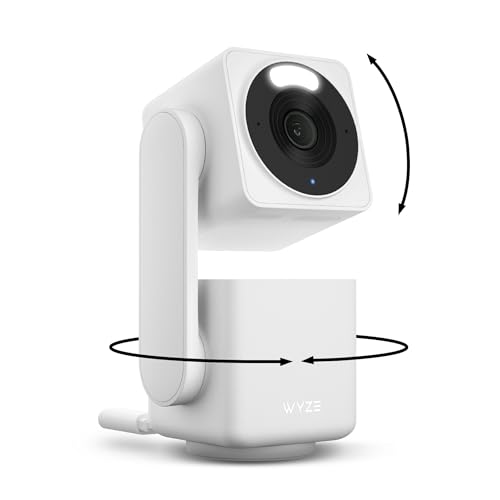
The Wyze Cam Pan v4 takes everything good about the standard v4 and adds 360-degree pan and vertical tilt control, all at 4K resolution. At around $60, it’s the camera you want if a fixed view isn’t enough. The use case for fishkeepers is straightforward: point it at your display tank during the day, swing it around to check the sump or ATO reservoir when you want, and set a “home” position it returns to after you’re done looking around.
The 4K bump over the standard v4 is more than vanity. At higher resolution, you can digitally zoom into specific areas of your tank without the image turning into a blurry mess. Trying to spot ich on a fish from across the room? That extra resolution helps. The pan/tilt motor is smooth and quiet enough that it won’t startle skittish fish if the camera is near the tank.
Like the standard v4, it records 24/7 to a microSD card with no subscription required for live viewing. It also has IP65 weather resistance, which is a genuine benefit near aquariums where humidity and salt creep are real concerns – especially around sumps and protein skimmers. The upgrade to USB-C power is welcome, though the same 2.4GHz-only WiFi limitation applies.
The honest caveat: this camera is physically larger than the standard v4 due to the motorized base. It needs a flat surface to sit on and can’t be wall-mounted as easily. If space near your tank is tight, the standard v4 on a magnetic mount might be more practical.
Pros
- 4K resolution with 360° pan and tilt from your phone
- Monitor tank, sump, and ATO with one camera
- IP65 weather resistance handles humidity near equipment
- USB-C power (finally)
- No subscription needed
Cons
- Bulkier than fixed cameras – needs a flat surface
- Still 2.4GHz WiFi only
- $60 is twice the standard v4 – overkill if you only monitor one tank from one angle
Cheapest Option: Blink Mini
Best For: Fishkeepers already in the Amazon/Alexa ecosystem who want the lowest possible entry price.
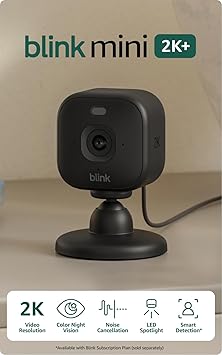
The Blink Mini is the cheapest way to put a camera on your tank. At around $25-35 depending on sales (and Amazon runs sales on these constantly), it shoots 1080p HD video with infrared night vision. If your only goal is a quick “is everything okay?” check from your phone, it does the job. The form factor is tiny – smaller than a tennis ball – so it tucks away on a shelf near the tank without being obtrusive.
Alexa integration is the real selling point. If you have an Echo Show, you can say “Alexa, show me the fish tank” and get an instant live feed on the screen. That hands-free access is genuinely convenient. You can also add the optional Pan-Tilt mount ($30 separately, or ~$60 bundled) to get remote pan and tilt control, though at that price you’re in Wyze Cam Pan v4 territory with better resolution.
The honest caveat: Blink pushes subscriptions harder than Wyze does. Without a plan, you get live viewing but no cloud clip storage – and Blink doesn’t support microSD cards directly. You need a separate Sync Module 2 ($35) with a USB drive for local storage, which kills the budget advantage. The camera also doesn’t support Google Assistant, so if you’re in the Google ecosystem instead of Amazon’s, skip this one entirely.
Pros
- Lowest entry price – frequently under $25 on sale
- Best Alexa integration of any camera on this list
- Tiny form factor
- Optional pan-tilt mount available
Cons
- No microSD slot – need Sync Module 2 for local storage
- 1080p only – noticeably less sharp than 2K+ options
- No Google Assistant support
- 5-minute live view limit without subscription
Best Glass-Mount Camera: HomiQ Q1
Best For: Fishkeepers who want a camera that mounts directly to glass without glare or reflection issues.

The HomiQ Q1 was originally built for terrariums and reptile enclosures, but the same features that make it work on a gecko tank – anti-reflective lens coating, magnetic glass mount, invisible IR night vision – make it one of the better options for aquariums too. The difference between this and pointing a Wyze at your tank is immediate: no glare, no reflection of the room behind you, and a flush mount that sits cleanly against the glass panel.
At 3MP (2K resolution) with an F1.6 aperture, the image quality is solid, and the “starlight vision” technology captures usable color footage in low light without needing a spotlight – which means no disrupting your fish during dark hours. The 940nm invisible IR LEDs produce zero visible glow, making this the least intrusive camera for sensitive species. It also supports both 2.4GHz and 5GHz WiFi, giving it a genuine technical edge over every Wyze camera on this list.
The most interesting feature for fishkeepers leaving town is the AI behavior alert system. Instead of generic motion detection (useless on a fish tank where everything is always moving), it monitors for unusual patterns like frantic movement or prolonged stillness and sends a notification. If a fish is in distress or a heater malfunctions and fish are clustering near the surface, you’ll get a heads-up rather than finding out when you get home.
The honest caveat: HomiQ is a newer brand without the multi-year track record of Wyze or Blink, and the product is marketed primarily toward reptile keepers – aquarium use is supported but isn’t the primary focus. Long-term reliability is unproven. The camera is also fixed-angle with no pan/tilt, and at ~$50, it costs more than the Wyze Cam v4 while offering lower resolution. You’re paying a premium for the glass-mount design, the anti-glare lens, and the behavior alerts. For reef keepers fighting blue light and glare issues, that premium is worth it. For a freshwater tank with standard white LEDs, the Wyze v4 at $36 is probably the smarter buy.
Pros
- Anti-glare lens coating designed for glass enclosures – no reflection issues on aquariums
- 940nm invisible IR won’t stress any fish species
- AI behavior alerts for unusual fish activity
- Supports 2.4GHz and 5GHz WiFi
- No subscription required, microSD up to 128GB
Cons
- Newer brand – limited long-term reliability data
- Marketed primarily for reptiles – aquarium use works but isn’t the main focus
- No pan/tilt option
- Pricier than Wyze for similar resolution
- 128GB microSD max vs. 512GB on Wyze
How to Fix the Blue Light Problem on Your Tank Camera
If you run blue, actinic, or mixed-spectrum lighting (which includes most reef setups and plenty of freshwater planted tanks), your camera feed is going to look purple. This is a white balance issue, not a camera defect. Here are the fixes, ranked from easiest to most effective.
Switch to IR Night Vision Mode
The quickest fix is forcing your camera into infrared night vision mode, even when the tank lights are on. IR mode ignores visible light and illuminates the scene with infrared instead, producing a clean grayscale image regardless of what color your LEDs are putting out. You lose color, but you gain a perfectly usable view of your tank. Most cameras (including all four on this list) let you toggle between auto, on, and off for night vision in the app settings. Set it to “on” during actinic hours.
Manual White Balance Adjustment
If your camera app offers manual white balance controls, you can shift the color temperature warmer to counteract the blue cast. This is the best solution if you want to maintain color footage. The Wyze app has limited white balance options – you can toggle between auto and manual presets. The HomiQ’s starlight sensor handles mixed lighting better natively. Cameras with full manual white balance (common in Amcrest and some Eufy models) give the most control, but the trade-off is a more complex app experience.
The Orange Lens Filter Trick
This one comes straight from the reef community and it works surprisingly well. Take an orange-tinted coral viewing lens (the kind handed out at reef shows and frag swaps) or a cheap pair of orange-tinted glasses, cut a piece to size, and tape or Velcro it over your camera lens. The orange filter physically blocks the excess blue wavelengths before they hit the sensor, producing a much more natural-looking image. It’s a $5 fix that outperforms most software solutions.
Camera Positioning to Reduce Glare
Don’t mount your camera flush against the glass unless it has anti-glare coating (like the HomiQ). Regular cameras pressed against an aquarium panel will pick up reflections of the room, the camera’s own IR LEDs, and status lights bouncing off the glass. Position the camera 6-12 inches back from the glass, angled slightly downward, and offset from center to minimize reflections. If glare is unavoidable from outside the tank, a black piece of card stock behind the camera blocks most reflections from the room.
Beyond the Camera: Vacation-Proofing Your Tank
A camera shows you what’s happening. These are the products that let you actually do something about it – or prevent problems from happening in the first place while you’re gone.
Auto Feeder
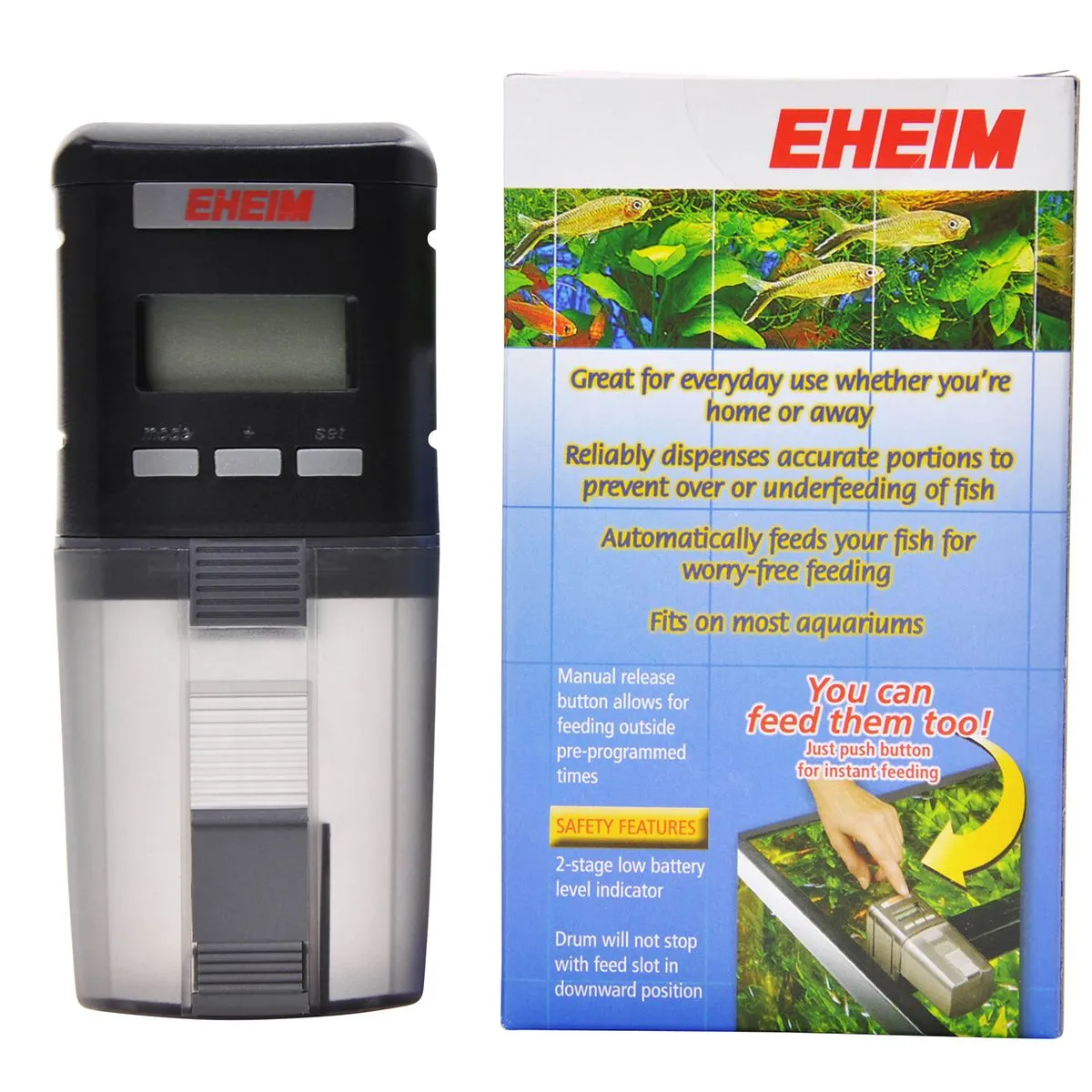
A camera that shows your fish starving doesn’t help. Any absence longer than a day or two needs an auto feeder. WiFi-connected models let you trigger feedings from your phone and even watch through a built-in camera as the food dispenses – useful for confirming food is actually hitting the water and not jamming in the hopper. Stick with pellet or flake foods in auto feeders. Freeze-dried and frozen foods clog mechanisms and foul water fast without someone there to clean up.
Auto Top-Off (ATO)
Evaporation doesn’t take a vacation. In a heated aquarium, especially open-top setups and sumps, water level drops are measurable within 24 hours. If you run a sump-based system, the water level in your sump directly affects your return pump’s performance and can burn out the pump if it runs dry. An ATO automatically replenishes evaporated water from a reservoir, keeping your water level – and your salinity, if you’re in saltwater – stable while you’re away. Size your reservoir for the length of your trip plus a margin of safety.

Smart Plug or Power Strip
This is the unsung hero of remote tank management. A WiFi smart plug between the wall and your equipment lets you power-cycle a frozen pump, a glitched heater controller, or a misbehaving powerhead from your phone. You see the problem on camera, you cycle the power remotely, you check the camera again to confirm the fix. It’s surprisingly effective for the kind of low-grade equipment hiccups that happen when you’re gone for a week. Label your plugs clearly in the app so you don’t accidentally kill power to the wrong piece of equipment.

Battery Backup / UPS
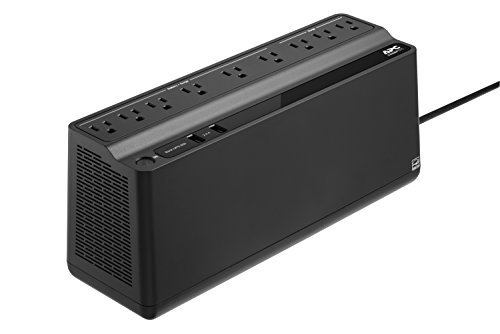
Power outages are the scenario every fishkeeper fears while traveling. Without circulation, oxygen levels drop within hours. Without heating (or cooling), temperature swings can stress or kill fish in under a day. A battery backup won’t run your entire system, but it can keep a return pump or powerhead and a heater alive long enough for you to react – or for power to come back. Even a basic UPS gives you a buffer of a few hours, which is the difference between a stressful phone call and a total tank crash. We have a full guide to aquarium battery backups with specific product recommendations and sizing advice.
Pre-Trip Checklist: Before You Leave Your Tank
Do this the day before you leave, not the morning of. If something goes wrong during prep, you want time to fix it.
| Task | Why It Matters | When |
|---|---|---|
| Water change (25-30%) | Starts your trip with the cleanest possible water. Don’t do a massive change – 25-30% avoids stressing fish before you leave. | Day before |
| Test water parameters | Confirm ammonia/nitrite at zero, nitrate reasonable. You don’t want to leave with an emerging cycle problem. | Day before |
| Clean filter media (rinse, don’t replace) | Reduces risk of clogging or reduced flow while you’re gone. Rinse in old tank water to preserve bacteria. | Day before |
| Top off ATO reservoir | Size for trip length + 2 extra days. Better to have too much RODI water than not enough. | Day before |
| Load and test auto feeder | Run at least two test cycles to confirm food dispenses properly. Adjust portion size – slightly underfeed rather than overfeed while away. | 2 days before |
| Set up camera and verify remote access | Confirm you can see the tank from your phone while on cellular data (not home WiFi). Test this from outside your house. | 2 days before |
| Brief your tank sitter | Leave written instructions: what’s normal, what’s not, your number, where the power shutoffs are. Keep it simple – one page max. | Day before |
| Unplug or secure anything risky | Loose airline tubing, protein skimmers that tend to overflow, CO2 systems with no pH controller – anything that could go wrong on its own should be secured or turned off. | Day of |
Common Mistakes with Fish Tank Cameras
Buying a camera that requires a subscription for live viewing. This is the most common regret. Some camera brands lock live streaming behind a monthly plan, and you don’t discover this until you’re trying to check your tank from the airport. Always confirm that free live viewing is included before you buy. Wyze and HomiQ both offer this. Blink offers limited free viewing.
Not testing remote access before leaving. Your camera works great on your home WiFi. But can you pull up the feed on cellular data from outside your house? Router settings, firewall rules, and app permissions can all block remote access. Test this before your trip, not during it.
Mounting the camera too close to glass without anti-glare. A regular camera pressed against your tank glass picks up reflections of the room behind you, the camera’s own IR LEDs, and every fingerprint on the panel. Either use a purpose-built glass-mount camera like the HomiQ, or position your camera 6-12 inches back from the glass at a slight angle.
Skipping the auto feeder because “they’ll be fine for a week.” Healthy adult fish can survive a week without food, technically. But “survive” and “thrive” aren’t the same thing. Hungry fish get stressed, pick at tankmates, and are more susceptible to disease. An auto feeder costs $15-30 and removes the biggest variable from your trip.
Forgetting about humidity near sumps and equipment. Cameras placed near a protein skimmer, sump overflow, or open-top tank are exposed to humidity and salt creep that will corrode electronics over time. Use a camera rated IP65 or higher (the Wyze Cam Pan v4 has this), or keep the camera away from the worst moisture sources. Wipe the lens monthly if you notice salt buildup.
Forgetting an SD card. Most cameras ship without a microSD card. If you’re counting on local recording during your vacation – and you should be – order the card at the same time as the camera and format it before you leave.
Frequently Asked Questions
Can you put a camera inside a fish tank?
There are a few purpose-built underwater aquarium cameras like the IceCap REEF-Cam and the Juwel SmartCam, but they’re niche products with limited availability and mixed reviews. For monitoring purposes, an external camera pointed at the tank is simpler, cheaper, and more reliable. Underwater cameras are more useful for content creation or close-up observation of specific corals or fish behavior than for day-to-day monitoring.
Do aquarium lights mess up camera image quality?
Blue and actinic spectrum lighting (common in reef tanks and some planted setups) causes most cameras to produce a purple or blue-washed image. The fixes are using IR night vision mode during blue-light periods, adjusting manual white balance if your camera supports it, or mounting an orange coral viewing lens over the camera. Full-spectrum white LEDs generally don’t cause issues.
What’s the cheapest way to monitor my fish tank remotely?
A Blink Mini on sale ($20-25) or a Wyze Cam v4 ($36) are the most affordable options with free live viewing through their phone apps. Of the two, the Wyze is a better value because it includes a microSD slot for local recording without any additional hardware purchases.
Do I need a subscription to watch my fish tank on my phone?
No. Both Wyze and HomiQ cameras offer free live viewing and local SD card recording without a subscription. Blink offers limited free live viewing (5-minute sessions). Subscriptions on all three brands unlock additional cloud storage and AI features, but they’re optional for basic tank monitoring.
Does infrared night vision stress fish?
Most hobbyists report no behavioral changes with IR cameras running. Newer cameras using 940nm IR LEDs produce zero visible light, making them invisible to fish. Older 850nm IR LEDs emit a faint red glow that some light-sensitive species may notice. If you’re concerned, the HomiQ uses 940nm LEDs, and all cameras on this list can have IR toggled off when not needed.
How long can you leave a fish tank unattended?
With an auto feeder and ATO running, most established freshwater tanks can go 7-10 days safely. Reef tanks with dosing, skimmer maintenance, and more sensitive livestock generally shouldn’t go beyond 4-5 days without someone physically checking in. A camera extends your reach but doesn’t replace hands-on maintenance for longer trips. Always arrange a tank sitter for vacations over a week.
What’s the best camera for a fish room with multiple tanks?
A pan-tilt camera like the Wyze Cam Pan v4 is ideal for fish rooms. Mount it centrally and you can rotate between tanks from your phone. At 4K, you can digitally zoom into individual tanks and still get a usable image. For larger fish rooms, two pan-tilt cameras positioned at opposite ends will cover everything without blind spots.
Do I need a camera if I already have a Neptune Apex?
Yes. An Apex monitors parameters and automates equipment responses, but it can’t show you what’s physically happening in the tank. A camera and a controller complement each other perfectly – the Apex tells you your temperature spiked, the camera shows you the heater is stuck on. The Apex tells you your sump level dropped, the camera shows you whether it’s an ATO failure or a leak. Some hobbyists even integrate camera feeds into their Apex Fusion dashboards.
How do I stop glare on my fish tank camera?
Position the camera 6-12 inches back from the glass at a slight angle rather than mounting it flush. Turn off or dim room lights behind the camera to reduce reflections. For cameras mounted directly on glass, use one with an anti-reflective lens like the HomiQ. A piece of black card stock or fabric behind the camera blocks most room reflections. The IR night vision mode also eliminates glare from room lighting since it uses its own infrared illumination.
Final Recommendation
For most fishkeepers, the Wyze Cam v4 is the right call. At $36 with no subscription required, 2.5K resolution, and local SD card recording, it gives you everything you need to monitor your tank remotely without overcomplicating things or overspending. Pair it with a microSD card, point it at your tank, and you’ve got reliable eyes on your setup from anywhere in the world.
If you run a sump or have multiple tanks in the same room, step up to the Wyze Cam Pan v4 for the 360-degree remote view. If you keep a reef tank and you’re fighting glare and blue light issues, the HomiQ Q1 solves those problems out of the box with its anti-reflective lens and glass mount. And if budget is the only priority, a Blink Mini on sale will get the job done.
Whichever camera you pick, don’t stop there. A camera shows you what’s happening – an auto feeder, an ATO, and a smart plug give you the ability to respond. The camera is step one. Vacation-proofing your tank is the complete package.
Wyze Cam v4
2.5K QHD resolution, color night vision, no subscription required, and local recording to microSD – all for under $40. The best value fish tank camera for the vast majority of setups.